1
Part Names and Functions
Front/Top
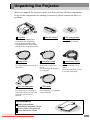
• Zoom ring (P.41)
•
Adjusts the image size.
• Focus ring (P.46)
Adjusts the image focus.
•
• Lamp cover (P.94)
Open this cover when replacing
the lamp unit inside the projector.
• Lamp cover opening switch (P.94)
Slide this switch to unlock the lamp
cover when removing it.
• Security lock (
•
Temperature indicator
(P.80)
Indicates abnormalities in the
internal projector temperature.
Lamp indicator (P.80)
Indicates a problem with the
projection lamp or that the lamp
needs to be replaced.
Operation indicator (P.80)
Flashes or lights to indicate the
operating status of the projector.
• Control panel (P.9)
)
(P.102)
• Air exhaust
vent
• Remote control receiver (P.14)
Receives signals from the remote
control.
• Handle
Hold this handle when
lifting and transporting
the projector.
• Front adjustable foot (P.42)
Extend and retract to adjust the
projection angle.
• Lens cover
Attach when not using the projector to
prevent the lens from becoming dirty or
damaged.
Downloaded
From projector-manual.com
8
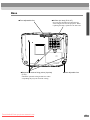
• Foot adjust button (P.42)
Press this button while lifting up
the projector in order to make
fine adjustments to the
adjustable foot or to retract it.