1
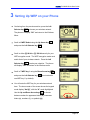
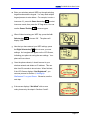
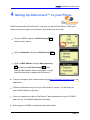
ZyXEL P-2000W Quick Start Guide Enter your wireless network WEP key through selecting keypad modes and the keypad. You may need multiple keypad presses to enter letters. For example, to enter a lowercase “b”, press the Down Arrow key to select lowercase mode, then press the “2” key twice. You can use the Power/ End key to remove typos. When finished entering your WEP key, press the Left Selector key to choose ‘OK.’ The phone will display “OK”. Now that you have entered your WEP settings, press the Right Selector key twice to save your new settings. An hourglass will appear on the LCD Screen, indicating your phone is saving the new settings. Your phone will now reboot. Once the phone reboots, it should connect to your wireless network and obtain an IP address. This can take from 30 seconds to two minutes. When finished, if the LCD Screen displays “Not Registered”, you can now proceed to Section 4, Setting Up GloConnect™ on your Phone. Otherwise, see the next step. If the screen displays “Net failed” with an error code, please retry the steps in Sections 2 and 3. Page 11