1
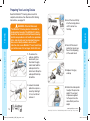
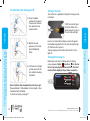
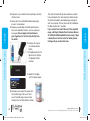
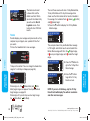
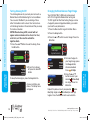
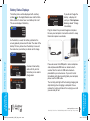
Setting the Date
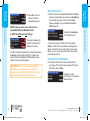
1. Press the Menu button to go to the Main Menu.
2. Press the Setup button.
3. Press the or button to select Date. Press the
OK button.
SETUP
Reminder
Date: 3/11/09
Time
Month/Day/Year
Day.Month.Year
DATE
CHANGE YEAR
OK
10 / 13 / 10
OK
10 / 13 / 10
DATE
CHANGE DAY
OK
10 / 13 / 10
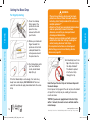
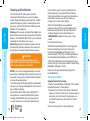
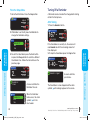
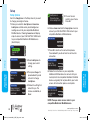
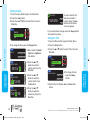
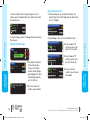
6. Press the or button to select the
correct year. Press the
OK button.
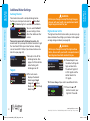
7. Press the or button to select the
correct month. Press
the OK button.
8. Press the or button to select the
correct day. Press the
OK button.
SETUP
Date
Time: 10:30 AM
Sound
OK
TIME
SELECT FORMAT
12 Hour Clock
24 Hour Clock
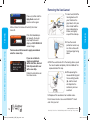
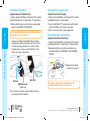
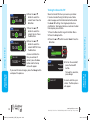
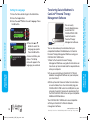
4. To change the time,
press the Change
button.
MAIN MENU
FUNCTIONS
DATE
CHANGE MONTH
5. Select either the Month/
Day/Year or Day.Month.
Year button.
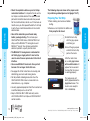
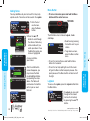
1. Press the Menu button to go to the Main Menu.
2. Press the Setup button.
3. Press the or button to select Time. Press the
OK button.
Setting the Time
Setting the Date
Change
Done
Setting the Time
DATE
MAIN MENU
FUNCTIONS
10/13/10
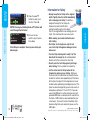
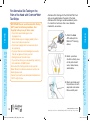
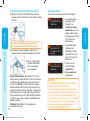
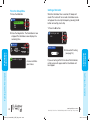
A screen confirms the
date you entered. If
correct, press the Done
button and the Setup
menu will appear.
If you need to make changes, press the Change button
and repeat the process.
OK
4. To change the date, press the Change button.
SELECT
Date is Set.
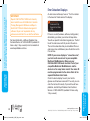
5. Select either the 12 hour clock or 24 hour clock
button.
®
50
84359751_CntrNextLINK_UG_EN_FpBp_v4.indd 50-51
www.bayerdiabetes.com/us
Need Help? Call toll free: 1.800.348.8100 (available 24 hours a day, 7 days a week)
51
3/29/12 12:19 PM