1
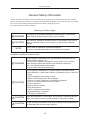
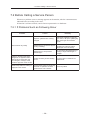
7.1 Inspection
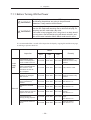
7.1.1 Before Turning ON the Power
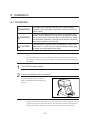
! WARNING
For safety reasons, be sure to turn OFF the power switch when
the following inspections are going to be performed.
Otherwise, it may result in electric shock.
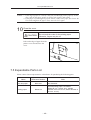
! WARNING
Clean the plug of the power cable periodically by unplugging it
from the AC outlet and removing dust or dirt from the plug, its
periphery and AC outlet with a dry cloth.
If the cable is kept plugged in for a long time in a dusty, humid
or sooty place, dust around the plug will attract moisture, and
this could cause insulation failure which could result in a fire.
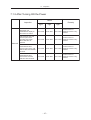
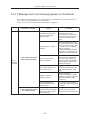
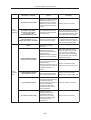
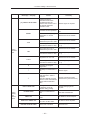
It is recommended that a record of the inspection be kept by copying this and the next page,
or making a separate check list.
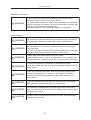
Result
Inspection
Power
supply
cable
Remedy
Date
/
Date
/
Date
/
Check that the power
cable is not damaged or
cover of cable is not torn.
Good / Bad
Good / Bad
Good / Bad
Contact Canon or
distributor if there is any
problem.
Check that the power
cable is inserted fully into
the connector on the
instrument and into the
AC receptacle.
Good / Bad
Good / Bad
Good / Bad
Fully insert the cable.
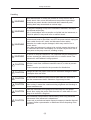
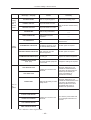
Check that the cover or
parts are not damaged
and not loose.
Good / Bad
Good / Bad
Good / Bad
Contact Canon or
distributor if there is any
problem.
Clean the protective glass
in the measurement
window.
Good / Bad
Good / Bad
Good / Bad
See section 7.3.1.
Disinfect the forehead
rest.
Good / Bad
Good / Bad
Good / Bad
See section 7.3.2.
Check that there are
enough sheets of chin rest
paper on the chin rest.
Good / Bad
Good / Bad
Good / Bad
Obtain paper if not
enough.
See section 7.4.1.
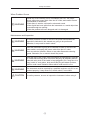
Check that there is
enough printing paper left.
Good / Bad
Good / Bad
Good / Bad
If not, replace the roll of
paper.
See section 7.4.2.
Check that the monitor is
clean.
Good / Bad
Good / Bad
Good / Bad
Clean the monitor.
See section 7.3.3.
Main unit
– 36 –