1
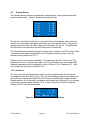
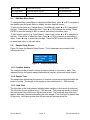
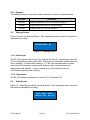
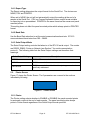
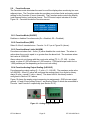
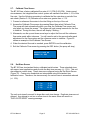
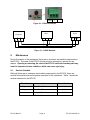
5.6. Favorites Screen The Favorites mode eliminates the need to scroll the display when monitoring two nonadjacent sizes. The Favorites mode also provides count alarm limits and analog output scaling for the Favorites (2 count channels). The Favorites mode controls the display (real time and history) and printer format. The CSV serial output includes all 6 sizes. Figure 18 – Favorites shows the Favorites screen. FAVORITES ON SIZE ALARM A-SCALE 0.3 0500000 0500000 5.0 0500000 0500000 Figure 18 – Favorites 5.6.1. Favorites Mode (ON/OFF) Enables or disables Favorites mode (On = Enabled, Off = Disabled). 5.6.2. Favorites Sizes (SIZE) Select 2 of the 6 standard sizes. Favorite 1 is 0.3 m in Figure 18 (above). 5.6.3. Favorites Alarm Limits (ALARM) Favorites count alarm limit. A zero (0) value disables the count alarm. The alarm is active when the count is equal to or greater than the alarm limit. The maximum alarm limit value is 9,999,999. Alarm values do not change with the count units setting (TC, /L, CF, M3). In other words, a value of 1,000 will alarm at 1,000 counts or 1,000 particles per cubic foot or 1,000 particles per liter depending on the count unit setting. 5.6.4. Favorites Analog Output Scaling (A-SCALE) Favorites analog output scaling (0 – 5 volts = 0 – VALUE). The maximum scale value is 9,999,999. A zero (0) value will configure the analog output for a digital or binary alarm (0 volts = normal, 5 volts = alarm). The alarm limit for this binary mode is configured in Section 5.6.3 above. Figure 19 shows the analog output connector pin assignments. GND pins are signal ground. A1 and A2 are Analog Output 1 and Analog Output 2 which are associated to Favorite 1 and Favorite 2 respectively (see Section 5.6.2). GND A2 GND A1 Figure 19 – Analog Output Connector BT-610 Manual Page 20 BT-610-9800 Rev A