1
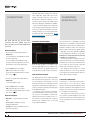
How to Calibrate Scratch Live
The Scopes
Calibration Troubleshooting
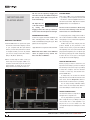
With music playing in the background (from any
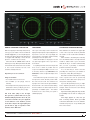
The scopes on the Setup screen in Scratch Live
After calibration, the number in the upper right
source), put your needle on the record with the
display the input signal as a phase diagram. The
corner of the scope view should say 0.0 while
turntable stopped. If you are using CD players,
key factors to look at on the scope display are
the needle is on the record and the turntable is
the same rules apply. Have the CD deck paused
crisp clean lines, round shape, and the tracking
stopped.
or stopped while calibrating. Ensure the rear
percentage in the lower right corner.
If that number is fluctuating then manually
panel P - L - S switches are set correctly.
Start both turntables or CD players. You will
move the Estimate slider to the right until that
Click and hold the estimate button until the
see green rings appear in the scope view as
number is stable at 0.0. If you’ve moved the
slider stops moving. Moving the threshold slider
shown above.
slider all the way to -24 and its still fluctuating
to the left will make Scratch Live more sensitive
For optimal performance the inner ring should
then you have a grounding or interference
to slow record movement, but also more
be as close to circular as possible. Use the
problem somewhere in the chain.
sensitive to background noise.
scope zoom slider (1x to 16x) to zoom in or out
If so, the first thing to check is that the
as necessary. Use the scope L/R Balance and
grounding wire coming from your turntable is
P/A Balance controls to adjust the shape of the
connected to a Sixty-One grounding post.
inner ring.
Next, make sure that the Sixty-One isn’t sitting
Things to remember:
The number in the top left corner of the scope
next to a power source such as a power strip
• Your needle must be on the record.
view gives the current absolute position within
and that the RCA cables aren’t laying across
• Your turntable (or CD player) must be
the control record or CD. The number in the
other power conducting cables.
top right corner is the current speed in RPM. In
If you are still experiencing issues, you might
• The background music playing must be at a
the bottom left is the current threshold setting,
have to adjust the placement of your setup. For
similar level to which you will play your set at.
and the number in the bottom right shows the
example, make sure bass bins aren’t directly
percentage of readable signal — this number
under the turntables.
should be close to 85% when your system is
If you have trouble getting the rings circular,
calibrated properly.
you probably need to clean or change your
Repeat the process for each deck.
stationary.
• Calibrate Scratch Live every time you play.
TIP: If the slider jumps to the far right,
then you have a problem with noise in your
needles.
turntables/CD players/mixer. Check all your
If the image appears as a line, then you
connections and make sure your equipment
have a missing channel. Check your RCA
is well earthed. In some situations you will
connections and needles. For more calibration
not be able to improve the signal quality, and
troubleshooting help see “Scope Reading and
you will have to play on regardless. In this
Fixes” in the manual.
situation, stick to REL mode.
RANE SIXTY-ONE FOR SERATO SCRATCH LIVE • QUICK START 2.4
3