1
Names and Locations
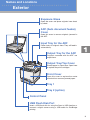
Exterior
Exposure Glass
Open the cover and place originals here sheet
by sheet.
ADF (Auto document feeder)
Cover
Open this cover to remove originals jammed in
the ADF.
Input Tray for the ADF
Place stacks of originals here. They will feed in
automatically.
Output Tray for the ADF
Originals scanned with the ADF are
output here.
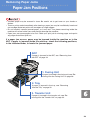
Output Tray/Top Cover
Printed paper is output here. Open here
to replace the print cartridges.
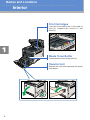
Front Cover
Open this cover to replace the waste
toner bottle or remove jammed paper.
Tray 1
Tray 2 (option)
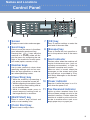
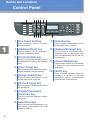
Control Panel
USB Flash Disk Port
Insert a USB flash disk for using the Scan to USB function or
connect a digital camera using a USB cable for PictBridge
printing.
3