1
Contents
Before you begin
3
Warnings and cautions.................................................... 3
Declaration of the manufacturer or importer .................... 4
Safety compliance .......................................................... 4
Electromagnetic compatibility .......................................... 4
Electromagnetic compatibility notices (SRMK2S)............. 6
FCC/emissions disclaimer – class A (USA)................ 6
Electromagnetic compatibility notices (SRMK2D) ............ 8
FCC/emissions disclaimer – class B (USA)................ 8
FCC Declaration of conformity................................... 9
Unpacking and inspecting
10
Check the accessory kit contents .................................. 10
Inspect the power cord (SRMK2S) ................................ 11
Installing system components
12
Tools and supplies needed............................................ 12
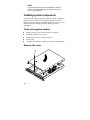
Remove the cover......................................................... 12
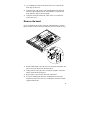
Remove the bezel......................................................... 13
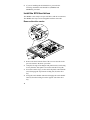
Install the SCSI hard drives........................................... 14
Remove the drive carrier ......................................... 14
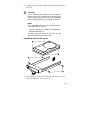
Install the drive in the carrier ................................... 15
Install the carrier/drive in the drive bay .................... 16
Install the processors .................................................... 17
Preliminary considerations....................................... 17
Install the processor chips ....................................... 19
Install the terminator ............................................... 20
Install the heat sinks................................................ 21
Install the memory (DIMM) boards ................................ 22
Install the add-in (PCI) boards....................................... 24
Remove the retention bracket and rear I/O panels... 24
Remove the riser card............................................. 25
Install the add-in boards in the riser card ................. 26
Install the add-in boards in the server ...................... 27
Replace the cover and bezel......................................... 28
Rack-mount the server.................................................. 29
Powering up
31
AC power cord requirements (SRMK2S) ....................... 31
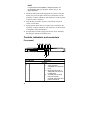
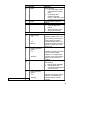
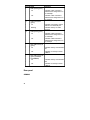
Controls, indicators, and connectors ............................. 32
Front panel ............................................................. 32
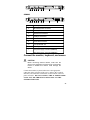
Rear panel .............................................................. 34
Connect the monitor, keyboard, and mouse .................. 35
1