1
Install the processor chips
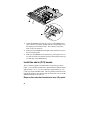
D
C
A
E
B
1.
2.
3.
4.
5.
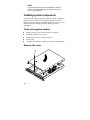
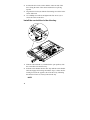
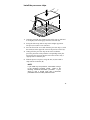
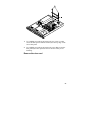
Grasp the end of the zero-insertion-force (ZIF) arm (A) and bend
it out slightly until it disengages from the socket tab (B).
Swing the ZIF arm up until it stops in the straight up position.
The processor socket is now unlocked.
Face the front of the server and orient the processor chip (C) with
the notch (D) in the upper left corner of the processor socket (E).
Gently place the processor chip on the socket so that the
processor pins mate exactly with the corresponding socket pins.
Do not force the processor into the socket since it takes only a
slight pressure to bend the pins.
With the processor in place, swing the arm (A) down until it
snaps into the socket tab (B).
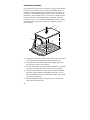
NOTE
If you install only one processor, a terminator must go
in the remaining processor socket. Refer to the
following “Install the terminator” procedure. If your
server is new, it should come with a terminator
preinstalled in the secondary PGA370 socket.
19