1
13
Note: Window’s mixer “sliders” are used for all level adjustments. For SDR radios with Virtual Audio
Cables such as PowerSDR, use the application’s software adjustments (VAC Rx / Tx Gain).
Power Setting:
Keep ALC < 0
For typical 100w radio
run < 25w average power
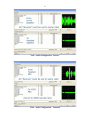
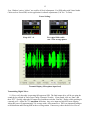
Transmit Display (Microphone input level)
Transmitting Digital Voice:
19. First, verify the radio is operating full output on SSB. The final output drive will be set using the
sound device selected in Tools>Auto Config>Transmit>To radio. If not started, click on “Start” and
then “PTT.” Quickly, adjust the RF output level and then watch the ‘Frm Mic” display while speaking in
a normal voice. Adjust for 75% maximum deflection. Any voice input too high will cause clipping.
Adjust RF power for approximately 25w average with a 100w transceiver. This is an important setting to
avoid distortion and lowering SNR at the receiving station. If necessary, reduce the drive level for no