1
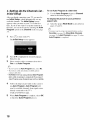
Favorites
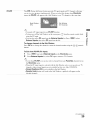
Lets you set up a list of up to 8 of your favorite
Press t/!l, to select the option
your Favorites
channels.
Add to Favorites
and press @
to add the current
channel
to
list.
To select a favorite
the channel.
channel
from the list, press t/l!, to go through
the list and @
to select
• To exit press _.
• To quickly
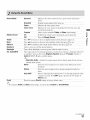
Cable
Add
Auto
On
Digitai
Channels
Program
access the Favorites
channel
Select if you are receiving
list, press _E_
cable channels
off .............................
Seleci if
yon are using an antenna.
Select to a£i_i digitai
chmmeis
without
to On or Off in Channel
Automatically
sets up the channel
via cable TV provider.
"'1
.....................................................................................................................
_=
rephtcing
Cable setting
choose.
when there is no menu on the
the origin;;l
chaunei
menu for the correct
list. Be sure toset
type of input signal
list on the TV for all receivable
channels
you
(Digital
and
Analog).
• Before starting Auto Program,
be sure to turn to On or Off on Cable option in the
Channel
menu. When it is On, the TV will search cable channels; when it is Off, the
TV will search over-the-air
signals with an antenna connection.
• If you are using an A-B RF switch (not supplied) to switch between
connection,
be sure to select the correct
cable or antenna
Cable option to On or Off in the Channel
Menu.
Program.
1
Select Auto
2
Select OK to start Auto
Program.
When
Auto
Program
is done,
select OK.
• IMPORTANT:
You most perfSrm
Auto Program after cable or antenna
is
connected.
If you cancel Auto Program some channels
may not be available.
Show/Hide
Channels
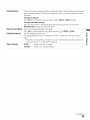
Allows you to show or hide channels that appear when you use the CH +1- button.
1
Press t/tf, to scroll through the channels until you find the channel you want to show or
hide.
2
Press @ to ctetennine if the channel will be shown or hidden.
To show or hide more channels,
repeat steps 1-2.
Label
Channels
Allows
you to assign
labels to channel
numbers.
1
Press t/tf, to scroll through the channel numbers.
number that you want to assign a label.
2
Press l,/*/t/l!,
to move through
it. To move to the next character
label. Then select
Then
press @ to select
the channel
the label characters
(A-Z, 0-9) and press @ to select
press _,/*/t/!l,.
Repeat to add up to 7 characters
to the
on screen
to set it. To assign
labels to more channels,
repeat
steps 1-2.
• To delete
a character
select
• To have a space between
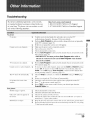
Diagnostics
Allows
to confirm
the current
on screen.
characters
channel
select
_
pertUrmance
on screen.
indicator.
(Continued)
33