1
Channel
Block
Allows
you to block channels
prior to blocking
channels.
regardless
of program
The blocked
channel
ratings.
The password
can only be viewed
needs
to be set up
by entering
the correct
password.
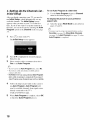
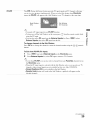
To block
a channel
Press ,1_/I!,to go through
To view a blocked
Press
_'_ when tuned to a blocked
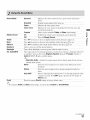
Parental
External
Input Block
the channels
Allows
Lock
settings,
Press tl4!, to scroll through
Change
Select to change
Use @-@
to Block or Allow
@
channels.
program,
then enter the password.
To reactive
the
mrn off and on the TV.
you to block individual
...........................
Password
and press
channel
video inputs.
the video inputs and press
@
to Block or Allow.
your password.
buttons
to select a t_ur digit password;
to confirm
password
enter
it again.
!-j
"d
• You need yonr password
your password,
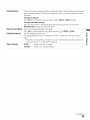
Select
Country
for any future
see "Lost Password"
access
into the Parental
lock settings.
If you lose
on page 41.
U.S.A.
Select to use U.S.A. ratings.
Canada
Select to use Canadian
ratings.
(Continued)
35