1
Battery Instructions
Features
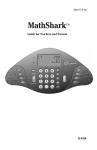
ANSWER PADDLES
Press paddles to
choose the correct
answer.
LCD WINDOW
Math problems
and elapsed time
appear here.
VOLUME DIAL
ON/OFF BUTTON
Digitz
automatically
shuts down
after 30
seconds of
inactivity.
When display dims or is blank, replace the old
battery with 3 new C batteries. To replace,
carefully remove the battery compartment door
(located on the bottom of the unit) from the
battery compartment. Install three (3) fresh C
batteries in the battery compartment, carefully
following the diagram showing correct battery
installation. This diagram is found next to the
battery compartment.
• Do not use rechargeable batteries.
• Do not mix old and new batteries.
• Do not mix different types of batteries: alkaline, standard (carbon zinc), or
rechargeable (nickel-cadmium) batteries.
• Non-rechargeable batteries are not to be recharged.
• Rechargeable batteries are to be removed from the product before being charged.
• Rechargeable batteries are only to be charged under adult supervision.
• Only batteries of the same or equivalent type as recommended are to be used.
• Batteries are to be inserted with the correct polarity.
• Exhausted batteries are to be removed from the product.
• The supply terminals are not to be short-circuited.
• To prevent corrosion and possible damage to the product, it is recommended to
remove the batteries from the unit if it will not be used for more than two weeks.
Cleaning instructions: Clean Digitz with a damp or dry cloth—do not immerse or spray
any liquid or water on Digitz.
Operating Digitz with the Adapter
LED NUMBER
Easy-to-read
bright red
numbers
GAME BUTTONS
Select a game by
pressing one of
these buttons.
HEADPHONE JACK
AC ADAPTER JACK
Digitz can be
powered by an AC
adapter (EI-8702)
sold separately.
See page 3 for
instructions.
BATTERY COMPARTMENT
Digitz can be powered by
3 C batteries (not included).
See page 3 for battery
instructions.
With the optional AC adapter, Digitz can run indefinitely without batteries. Follow
these steps for using the adapter with your Digitz unit:
1. Plug the end of the adapter cord into the AC adapter jack located on the back of
the Digitz unit.
• The Digitz unit must only be used with the recommended AC adapter. Adapters
are available from your authorized Educational Insights dealer. The Educational
Insights stock number is EI-8702.
• The AC adapter should be examined regularly for damage to the cord, plug,
enclosure, and other parts. In the event of such damage, do not use the AC
adapter until the damage has been repaired.
• Disconnect the Digitz unit from the AC adapter before cleaning.
• The AC adapter unit is not a toy.
2. Carefully plug the adapter body into an electrical outlet.
• The Digitz unit must not be connected to more than the recommended number of
power supplies.
• Digitz is not suitable for children under three (3) years of age.
It is strongly recommended that you keep Digitz plugged in whenever possible to
conserve battery power.
BACK OF UNIT
PAGE 2
PAGE 3