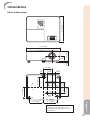
1
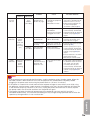
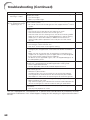
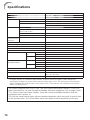
Problem
Check
Maintenance indicator on • See “Maintenance Indicators”.
the projector illuminates
or blinks in red.
• Change the input signal type setting.
Picture is green on
COMPUTER (YPbPr)/
HDMI (YPbPr)
Page
54
41
Picture is pink
(no green) on
COMPUTER (RGB)/
HDMI (RGB)
Picture is too bright and
whitish.
• Image adjustments are incorrectly set.
The cooling fan becomes • When temperature inside the projector increases, the cooling fan runs
faster.
noisy.
•
The lamp indicator is illuminating in red.
The lamp does not light
Replace the lamp.
up even after the
projector turns on.
39
8, 9
53, 54, 55
54, 57, 58
The lamp suddenly turns
off during projection.
The image sometimes
flickers.
The lamp needs much
time to turn on.
• Cables are incorrectly connected to the projector or the connected
equipment works improperly.
• If this happens frequently, replace the lamp.
• The lamp will eventually need to be changed.
While the remaining lamp life draws to a close, replace the lamp.
19–22
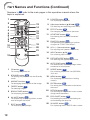
• Operate the remote control while pointing it at the projector's remote
control sensor.
• The remote control may be too far away from the projector.
• If direct sunlight or a strong fluorescent lamp is shining on the
projector's remote control sensor, place the projector where it will not
be affected by strong light.
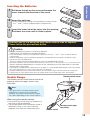
• The batteries may be depleted or inserted incorrectly. Make sure the
batteries are inserted correctly or insert new ones.
13
57
57
Picture is dark.
The remote control
cannot be used.
13
Appendix
67