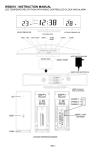
1
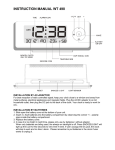
TO SET CALENDAR, 12/24 TIME AND TIME
1. Press and hold SET for 2 seconds, time digits change to “24 Hr” and flash, press +/- to select “12
Hr” time format or “24 Hr” time format. When 12HR is selected, AM or PM will be displayed.
2. Then press SET once again, time digits change to “00”and flash. Press +/- button to select time
zone:
“00” = GMT +1 hour (e.g. Germany)
“01” = GMT +2 hours (e.g. Finland)
“-01” = GMT 00 hour (e.g. U.K.)
3. Then press SET once again, hour digits flash. Press +/- button to set hour.
4. Then press SET once again, minute digits flash. Press +/- button to set minute.
5. Then press SET once again, time digits change to year “2009” and flash. Press+/- to set the year.
6. Then press SET once again, month digits flash. Press +/- button to set month.
7. Then press SET once again, date digits flash. Press +/- button to set date.
8. Then press SET once again, day of week digits flash. Press +/- button to select the language of
day of week.
EN = English
GE = German
FR = French
IT = Italian
DU = Dutch
SP = Spanish
DA = Danish
9. Press SET to return to normal mode, or it will return to normal mode in around 30 seconds if no
press of any other buttons.
TO SET ALARM TIME
Press and hold ALM SET / ON-OFF once, time digits change to alarm time digits “0:00 AL” and hour
digits flash. Then press +/- to set your desired hours of alarm time.
Press ALM SET / ON-OFF once, alarm minute digits flash. Press +/- to set your desired minutes of
alarm time.
Press ALM SET / ON-OFF once to return to normal mode, or it will return to normal mode in around
30 seconds if no further press of any other buttons.
TO TURN ON OR OFF YOUR ALARM
Press ALM SET / On-Off once to turn on or off the daily alarm. When the alarm function is turned on,
the
icon appears between the hour and minute digits.
TO USE SNOOZE ALARM
When time reaches your set alarm time, your clock will give beep sound to wake you up. The
will flash.
1)
Press SNOOZE on the top once to stop the alarm temporarily, the “
flashing. The alarm will beep again in 5 minutes.
P. 3
” and “Zz” icon keep
icon