1
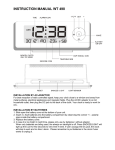
INSTALLATION For best reception of radio controlled signal, keep your clock close to a window and away from metal surfaces, electrical appliances and magnetic fields. BATTERY INSTALLATION 1. Slide open the battery cover at the bottom of your unit. 2. Insert 3 x AAA batteries into the battery compartment by observing the correct + / - polarity signs inside the battery compartment. 3. Replace the battery cover. Your clock is ready to work you. ENVIRONMENTAL RECEPTION EFFECTS Your radio controlled clock obtains the accurate time with wireless technology. Same as All wireless devices, the receiving ability maybe affected by, but not limited to, the following circumstances: Long transmitting distance Nearby mountains and valleys Among tall buildings Near railway, high voltage cable etc. Near freeway, airport, etc Near construction site Inside concrete buildings Near electrical appliances Near computers and TV’s Inside moving vehicles Near metallic structures Place your clock at a location with optimal signal, i.e. close to a window and way from metal surfaces or electrical appliances. DCF SINGAL RECEPTION AND SIGNAL INDICATOR After your clock is powered up, it starts to receive DCF signal. The Weak or no DCF signal (only Receiving strong DCF signal ( icon flashing) Successful Reception ( icon becomes static) Failed Reception ( icon disappear) icon flashes. icon flashing) Automatic reception and Manual Reception Your clock starts automatic reception everyday at 1:00, 2:00, 3:00. If it fails to receive the DCF time signal at 3:00, it will start reception at 4:00. If it fails again it will start reception at 5:00. If it fails again it will start automatic reception at 1:00 again in the next day. Manual reception: simply press WAVE button once to start manual reception. Press and hold WAVE for 2 seconds to stop manual reception. Remark: when your clock is receiving radio controlled time signal, all buttons except the snooze / light button do not function. P. 2