1
Audio
2. Monitor audio quality — Diagnostic tool to monitor the
audio quality.
NewCall
Call state
Icon
Do Not Disturb
Outgoing call, Incoming call (ringing)
Use to make a conference call.
Behaves like the Conf context-sensitive soft key.
November 2013
Missed call
Park
Park the current call to the server or another user (not
available for all call servers).Retrve
Instant messaging
Icon
New, unread
Retrve
Retrieve parked calls (local and server parked calls only).
Prefs
Access Display, Audio, Feature Options, Language,
Misc Options, Network, USB Locks, and User Settings.
Read
Replied to
Sent/forwarded
More…
Select a new menu list.
Inbox
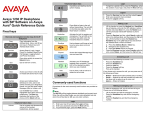
Display screen icons
•
•
•
•
Call state — Icons to indicate the call state of your phone.
Instant Messaging — Icons displayed when you view your
instant message log. The icon appears beside each IM to
indicate the status.
Inbox — Icons to indicate the status of each incoming calls in
your Inbox.
Presence — Icons to indicate the presence state of those
address book entries you designate as Friend.
Incoming Call, Missed, New
Incoming Call, Missed, Reviewed
Presence
Terminated
Call state
On hook
Icon
Connected Inactive (only available if
audio presence is activated)
On the phone
Unavailable Busy, or Offline
On hold
Call Forward
Icon
Incoming Call Answered
The following table lists the screen display icons for:
Icon
Unknown
Obtain a dial tone to place another call during an active call.
•
•
Presence
Active Available (only available if audio
presence is activated)
On the Phone (only available if audio
presence is activated)
Icon