1
Placing Originals
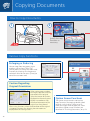
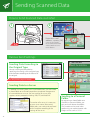
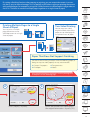
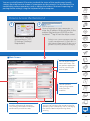
There are two ways to place originals on the machine. You can either place them on
the platen glass, or use the feeder. When you want to copy/scan multiple documents
at once, place the originals in the feeder. When copying/scanning originals that
cannot be placed in the feeder (books, a single page of a stapled document, etc.),
place the original directly on the platen glass.
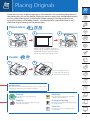
Platen Glass
1
2
3
With the side of the original you want to
scan face down, align the top edge of your
original with the back edge of the platen
glass (by the arrow in the top left corner).
Feeder
1
2
Place the originals in the
feeder with the side that
you want to scan face up.
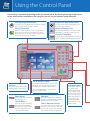
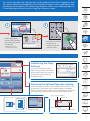
Numeric Keys
Use these keys when entering numeric values, such as when
entering fax numbers or the number of copies.
Start Key
Reset Key
Stop Key
ID (Log In/Out) Key
Press this key to start copying or
scanning.
Press this key to stop a copy/scan job
currently in progress.
Press this key to restore the standard
settings of the machine.
Press this key to log in/out when using
the login service.
Clear Key
Press this key to clear entered values
or characters.
3