1
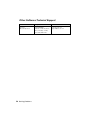
Light status
Cause
Solution
See page 15.
P
H
)
On
On
Off
An ink cartridge is
expended or not
installed correctly.
P
H
)
Off
Flashing
fast
Flashing
fast
A part needs to be
replaced.
Contact your local
authorized servicer or
contact Epson for a
referral; see page 23.
P
H
)
Off
Flashing
Flashing
There is a problem with
the printer.
Turn the printer off and
then back on. If the
error does not clear,
contact your local
authorized servicer or
contact Epson for a
referral; see page 23.
Problems and Solutions
Check the solutions below if you’re having trouble using your printer.
Paper Feeding Problems
■
Make sure the paper size settings are correct for the paper you loaded.
■
Make sure your paper is loaded short edge first and is positioned against the
right edge guide with the left edge guide against its left side. Don’t load paper
above the arrow mark inside the left edge guide.
■
If paper doesn’t feed, remove it from the sheet feeder. Flip through the stack to
separate the sheets a little. Then reload the paper against the right edge guide,
and slide the left edge guide against the paper (but not too tightly). Make sure
the paper is not in front of the feeder guard.
■
Do not load too many sheets at once (up to 20 sheets of photo or matte paper
and 80 sheets of plain paper). See the User’s Guide for more information.
Problems and Solutions 21