1
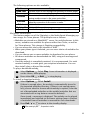
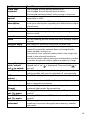
Problem
Numbers cannot
be entered in the
display
Phone switches on
but there is no
display
Battery icon (
)
not flashing 1-2-3
during charging
Flashing
(......) softkey
Possible cause and solution
Keypad lock is on ( is displayed). Press and hold
off.
to turn
Display contrast is turned down too low. Reset contrast (see
page 27).
Indicates a charging or battery problem. Turn off and
disconnect the charger. Reconnect and try again.
If the problem remains contact your dealer.
There is not enough memory to store another SMS message.
You must delete one or more of the existing stored messages
(see page 13).
Function no longer available in the SIM or was subscription
dependent. Reprogram the softkey (see page 27).
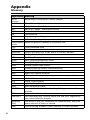
Error messages
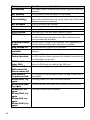
Problem
Allowed credit
reached!
Possible cause and solution
You are trying to place an outgoing call and the allowed
credit is already reached.
The allowed credit limit is reached during an outgoing call
(the call is then aborted).
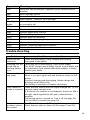
Busy
You are trying to make a call and the call fails because the
destination number is already engaged in conversation.
Call failed
The user is unreachable.
The outgoing call fails due to:
the network cannot take the call because the system busy
or the number is out of order or
the number is unreachable or
the network does not answer or
the option to hide your phone number when calling is not
supported by the network
Control the ability to hide your ID when making a call
(service availability in network).
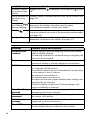
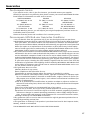
Cancelled. No type Cell broadcast activation has been requested but no
selected
message type has been selected.
Cannot execute
You have made a request which cannot be performed in
command
the current call situation.
Can't display
The short message text cannot be displayed (characters not
message
recognised, incorrect format etc...)
Check SIM!
There is no SIM present or the SIM is incorrectly inserted.
See First Steps with your Eclipse for more details.
64