1
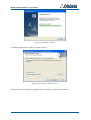
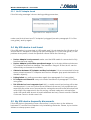
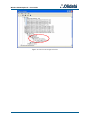
Wireless USB Adapter Kit - User Guide 5.3.1 No PC Adapter found If the following message is shown during pairing procedure, Figure 22: No PC Adapter found make sure that at least one PC Adapter is plugged (see also paragraph 5.2 of the user guide), and try again. 5.4 My USB device is not found If the USB device is connected to USB cradle and it is not detected by Windows, first check that PC Adapter is working well (see paragraph 5.2 of the user guide.). If the problem does persist, check the possible causes within the following: Device Adapter is not powered: make sure that USB cradle is connected to fully functional power supply; Device Adapter is not within operational range: try to shorten distance between PC Adapter and Device Adapter. The maximum range is 30 feet, but it can be affected by environment conditions; Obstacles between PC Adapter and Device Adapter: it is recommended to keep space clear between PC Adapter and Device Adapter (pay special attention to metallic objects); Pairing failed: try pairing procedure again (see paragraph 0 of user guide); PC Adapter not detected: carry out checks described on paragraph 5.2 of the user guide; This USB device is not supported yet: this is a really recent technology still under development. It can occur that some USB devices are not fully supported yet, especially the older ones. Several device categories are still under development and will be fully supported in the future (eg.: several webcams, microphones, audio USB cards and almost all audio-enabled devices). Please contact Olidata Customer Care to obtain more info. 5.5 My USB device frequently disconnects If the USB device frequently looses connection, it may be due to the distance between PC and Device Adapters or by interfering obstacles. Please, try to shorten distance or keep space clear. 20