1
Wireless USB Adapter Kit - User Guide
Table of contents
1
Introduction ...................................................................................................... 2
1.1
1.2
1.3
2
Package contents ................................................................................................. 2
System requirements ............................................................................................. 3
Installation steps in short ........................................................................................ 3
Software installation ........................................................................................ 6
2.1
2.2
3
Installation on Windows XP ................................................................................... 6
Installation on Windows Vista ............................................................................... 9
First use ........................................................................................................... 13
3.1
3.2
3.3
3.4
3.5
4
Suggestions for a better use ............................................................................... 13
How to connect the PC Adapter....................................................................... 13
Device Adapter pairing ...................................................................................... 13
Device Adapter installation ................................................................................ 14
USB device connection .......................................................................................... 14
Manager software ......................................................................................... 15
4.1
4.2
4.3
5
Icon meanings ..................................................................................................... 15
User interface ....................................................................................................... 15
Device Adapters management ........................................................................ 17
Troubleshooting ............................................................................................. 19
5.1
5.2
5.3
Installation does not automatically start from CD ............................................ 19
PC Adapter not found or not ready .................................................................. 19
Troubles with pairing procedure ........................................................................ 19
5.3.1 No PC Adapter found ................................................................................................... 20
5.4
5.5
5.6
My USB device is not found ................................................................................ 20
My USB device frequently disconnects ............................................................. 20
Other diagnosis tools ........................................................................................... 21
5.6.1 LED indications ............................................................................................................... 21
5.6.2 Drivers installation check .............................................................................................. 21
6
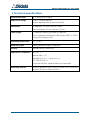
Technical specifications ............................................................................... 23
7
Environment preservation ............................................................................. 24
1