1
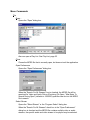
Test Pattern (Active only when no file is open.)
100% SMPTE Color Bars
Displays NTSC 100% Color Bars or 100% amplitude, 100% saturation
PAL color bars depending on video standard selected by the Options Video Standard command. If Auto is selected, the last video standard
usedused.
75% SMPTE Color Bars
Displays NTSC 75% Color Bars or 100% amplitude, 75% saturation PAL
color bars depending on video standard selected by the Options -Video
Standard command. If Auto is selected, the last format played is used.
Luminance Ramp
Displays an NTSC or PAL linear luminance ramp depending on video
standard selected by the Options -Video Standard command. If Auto is
selected, the last format played is used.
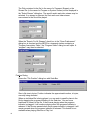
Display from File …
Display a stored image file.
The stored image can be either a standard Windows® BMP 24 bit RGB
color image or a Stradis proprietary YUV format that is 720 x 480 pixels
(when NTSC is selected) or 720 x 576 pixels (when PAL is selected).
Images that are up to 1024 pixels wide can be used, but will be cropped to
720 pixels. Stradis provides a utility program (MakeYUV.exe) for
converting BMP file into YUV files as part of the software distribution. The
advantage to the YUV format is that it loads much faster than the BMP
format.
Note: When creating .bmp files it is important to realize that NTSC or PAL
video monitors have rectangular pixels whereas computer monitors
typically have square pixels. For NTSC, the width of the image should be
about 10% (1.1x) wider when displayed on a square pixel monitor. For
PAL, the image should be about 8% (.92x) narrower when displayed on a
square pixel monitor.
21