1
Chapter 4 Installation and calibration
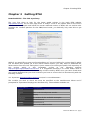
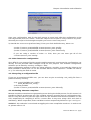
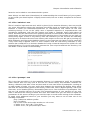
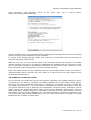
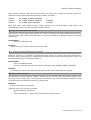
Illustration 9: Editing the rtai_hal.h file to insert the real
calibrated values.
These values can also be passed to the modules, thus avoiding recompiling RTAI and allowing
an easier/portable installation on different machines. The timer setup and the latency can be
passed to the scheduler module while the APIC and CPU frequency to the rtai_hal module like in
the following examples:
Get the result coming out from calibrate -c which is the CPU Frequency and type:
insmod rtai_hal.ko rtai_cpufreq_arg=996677084
If the APIC is present run calibrate -a and pass the result to rtai_hal with:
insmod rtai_hal.ko rtai_apicfreq_arg=VALUE_FOR_THE_APIC
The 8254 Calibration and the Latency (calibrate -r and -k or -u) should be passed to the
scheduler rtai_ksched or rtai_lxrt
insmod rtai_lxrt.ko SetupTimeTIMER=xvalue Latency=yvalue
or
insmod rtai_ksched.ko SetupTimeTIMER=xvalue Latency=yvalue
Note: The latency should be calibrated to find out an average value which has to be acceptable
both for kernel and for user, even if, as you will notice, the differences are very small. While, if
your own RTAI project, is based only on kernel or only on user mode, just check the latency for
the selected scheduler.
At the end you may want to run again the latency test and the calibration to verify the latest
performance level after the tuning procedure.
RTAI User Manual 3.3 - pag 15