1
ENGLISH
Table of Contents
Introduction ....................................................................................... 1
Features ........................................................................................................ 1
Package Contents ........................................................................................ 1
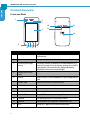
Product Overview ......................................................................................... 2
Front and Back ..................................................................................... 2
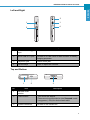
Left and Right ....................................................................................... 3
Top and Bottom .................................................................................... 3
LED Indicators .............................................................................................. 4
Getting Started .................................................................................. 5
Inserting the Battery ...................................................................................... 5
Charging the Battery ..................................................................................... 6
Inserting the MicroSD Card .......................................................................... 7
Inserting the SIM Card .................................................................................. 7
Powering the Device On/Off ......................................................................... 8
Suspend Mode ..................................................................................... 8
Unlocking the Screen .................................................................................... 9
Using the Android Industrial Smartphone ...................................... 10
Understanding the Interface ......................................................................... 10
Home Screen Overview ....................................................................... 10
Status and Notifications ....................................................................... 11
Using the Touch Screen ....................................................................... 12
Managing the Home Screen ................................................................ 13
Opening Applications ........................................................................... 14
Changing Basic Settings ............................................................................... 15
Setting the Date and Time ................................................................... 15
Configuring Display Settings ................................................................ 16
Configuring Sound Settings ................................................................. 17
Managing Wireless and Network Settings .................................................... 18
Connecting to Wireless Networks ........................................................ 18
Connecting to Bluetooth Devices ......................................................... 18
Configuring Language and Keyboard Settings ............................................. 19
Changing the System Language .......................................................... 19
Changing the Input Settings ................................................................. 19
Using the User Dictionary .................................................................... 20
Advanced Settings ........................................................................................ 21
Configuring Location Services ............................................................. 21
Configuring Security Settings ............................................................... 21
Adding an Account ............................................................................... 22
Managing Storage Space ..................................................................... 24
Application and Operation ............................................................... 25
Browser ......................................................................................................... 25
Launching a Web Page ........................................................................ 25
i