1
Contents
Before you begin
ix
Welcome to OrCAD . . . . . .
How to use this guide . . . . .
Symbols and conventions
Related documentation . .
Chapter 1
Chapter 2
.
.
.
.
.
.
.
.
.
.
.
.
.
.
.
.
.
.
.
.
.
.
.
.
.
.
.
.
.
.
.
.
.
.
.
.
.
.
.
.
.
.
.
.
.
.
.
.
.
.
.
.
.
.
.
.
.
.
.
.
.
.
.
.
.
.
.
.
.
.
.
.
.
.
.
.
.
.
.
.
.
.
.
.
.
.
.
.
.
.
.
.
ix
x
x
xi
Overview . . . . . . . . . . . . . . . . . . . . . . . . . . . . .
CIS product history . . . . . . . . . . . . . . . . . . . . . . .
The internet component assistant (ICA) . . . . . . . . . . . .
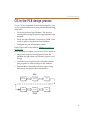
CIS in the PCB design process . . . . . . . . . . . . . . . . .
The CIS work environment . . . . . . . . . . . . . . . . . . .
The part manager window . . . . . . . . . . . . . . . . .
The CIS explorer window . . . . . . . . . . . . . . . . .
The footprint window . . . . . . . . . . . . . . . . .
The part window . . . . . . . . . . . . . . . . . . . .
The visibility window . . . . . . . . . . . . . . . . .
The explorer window . . . . . . . . . . . . . . . . . .
The database parts window . . . . . . . . . . . . . .
The ICselector window . . . . . . . . . . . . . . . . .
The OrCAD component data server (CDS) window
.
.
.
.
.
.
.
.
.
.
.
.
.
.
.
.
.
.
.
.
.
.
.
.
.
.
.
.
.
.
.
.
.
.
.
.
.
.
.
.
.
.
.
.
.
.
.
.
.
.
.
.
.
.
.
.
.
.
.
.
.
.
.
.
.
.
.
.
.
.
.
.
.
.
.
.
.
.
.
.
.
.
.
.
.
.
.
.
.
.
.
.
.
.
.
.
.
.
.
.
.
.
.
.
.
.
.
.
.
.
.
.
1
3
4
5
6
6
7
8
9
9
9
10
10
11
.
.
.
.
.
.
.
.
.
.
.
.
.
.
.
.
.
.
.
.
.
.
.
.
.
.
.
.
.
.
.
.
.
.
.
.
.
.
.
.
.
.
.
.
.
.
.
.
.
.
.
.
.
.
.
.
.
.
.
.
.
.
.
.
13
14
14
16
21
22
22
24
What is the OrCAD Component Information System™?
Setting up OrCAD CIS
.
.
.
.
.
.
.
.
1
13
Overview . . . . . . . . . . . . . . . . . . . . . . . . . .
Creating a part database . . . . . . . . . . . . . . . . .
Choosing a database format . . . . . . . . . . . . .
Determining part properties . . . . . . . . . . . . .
Setting the field format . . . . . . . . . . . . . . . .
Using more than one table . . . . . . . . . . . . . .
Creating a part database from an existing design .
Extracting part information from an MRP database
.
.
.
.
.
.
.
.
.
.
.
.
.
.
.
.
.
.
.
.
.
.
.
.