1
Contents
1: Introduction................................................................................................................ 1
1.1 What is the Lantronix SDK?..........................................................................................................1
1.1.1 Who Would Use the Lantronix SDK? ...........................................................................1
1.1.2 What Can the Lantronix SDK Do? ................................................................................1
1.2 What is PUC?.................................................................................................................................2
1.2.1 Differences from C ........................................................................................................2
1.2.2 Limitations .....................................................................................................................2
1.2.3 Non-Standard Behaviors................................................................................................3
1.2.4 Known Bugs ..................................................................................................................3
1.2.5 Important Limits ............................................................................................................3
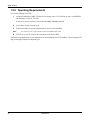
1.2.6 Operating Requirements ................................................................................................4
2: Installing the PUC Files............................................................................................. 5
2.1 What’s Included in the Distribution...............................................................................................5
2.2 MSS Optimization .........................................................................................................................5
2.3 UNIX Installation...........................................................................................................................6
2.4 Windows Installation .....................................................................................................................6
3: Getting Started........................................................................................................... 7
3.1 How to Run PUC ...........................................................................................................................7
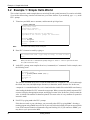
3.2 Example 1: Simple Hello World....................................................................................................8
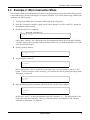
3.3 Example 2: More Interactive Mode ...............................................................................................9
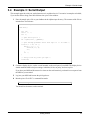
3.4 Example 3: Serial Output.............................................................................................................11
3.5 Example 4: Network Socket Connection .....................................................................................12
3.6 Example 5: Network/Serial Combination ....................................................................................13
3.7 Example 6: Autorun Mode...........................................................................................................14
3.7.1 Autorun Overview .......................................................................................................14
3.7.2 Autorun Example .........................................................................................................15
4: Debugging ................................................................................................................ 17
4.1 Errors............................................................................................................................................17
4.1.1 Common C Language Errors .......................................................................................17
4.1.2 Common Linking Errors ..............................................................................................17
4.2 Interactive Mode Help .................................................................................................................18
4.2.1 Return Values ..............................................................................................................18
4.2.2 Show Command...........................................................................................................18
4.2.3 Trace Command...........................................................................................................18
4.3 Alternate Compiling Environment...............................................................................................19
5: Sample Code ............................................................................................................ 21
5.1 Miscellaneous Samples................................................................................................................21
5.2 PUC Network Samples ................................................................................................................22
5.3 Stevens’ Network Samples ..........................................................................................................23
i