1
PRIVACY ZONE
----------------------------MASK NO.
1
DISPLAY
CLEAR MASK
<EDIT MASK>
Dome camera setup
Edit mask
Privacy zone
EDIT MASK 1
-----------------------------
DOME CAMERA SETUP
----------------------------<CAMERA SETUP>
<MOTION SETUP>
<PRESET SETUP>
<VST SETUP>
<PATTERN SETUP>
<GROUP SETUP>
OFF
CANCEL
BACK
EXIT
MOVE TO TARGET POSITION
[NEAR:SELECT/FAR:CANCEL]
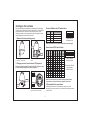
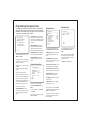
From the display setup menu, use the joystick
to highlight PRIVACY ZONE and key: NEAR
From the privacy zone menu, use the joystick
to highlight EDIT MASK and key: NEAR
MASK NO. (1-4) - shows the privacy zone
currently being modified.
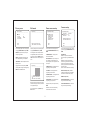
Use the joystick to move the speed dome to
the approximate position and zoom level for
the privacy zone and key: NEAR to select or
FAR to cancel and return to the privacy zone
menu.
DISPLAY - determines whether the privacy
zone is displayed during normal operation.
BACK
EXIT
Highlight the item to modify and key: NEAR
Use the joystick to change the setting and key:
NEAR to save or: FAR to cancel.
EDIT MASK 1
-----------------------------
[NEAR:SAVE
FOCUS MODE
MANUAL - the operator must focus the
camera manually using the NEAR and FAR
keys
SEMIAUTO - the camera automatically
focuses during normal PTZ movement but
preset focus information is stored when a
preset is programmed and recalled each time
the preset is called
AUTO - the module auto focuses continually
<PATTERN SETUP> - full management and
programming of pattern tours.
/FAR:CANCEL]
BACK
EXIT
<CAMERA SETUP> - setup of specific
camera module features.
<PRESET SETUP> - full management and
programming of individual presets.
:ADJUST MASK WIDTH]
:ADJUST MASK HEIGHT]
<WHITE BALANCE SETUP>
<AUTO EXPOSURE SETUP>
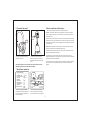
From the dome camera setup menu, use the
joystick to highlight CAMERA SETUP and key:
NEAR
<VST SETUP> - full management and
programming of VST functions.
[
[
ZOOM CAMERA SETUP
----------------------------FOCUS MODE
SEMIAUTO
DIGITAL ZOOM
ON
IMAGE FLIP
OFF
From the main menu, use the joystick to
highlight DOME CAMERA SETUP and key:
NEAR
<MOTION SETUP> - setup of the pan / tilt /
zoom operation of the speed dome, park
action configuration, and configuration of the
alarm inputs.
<EDIT MASK> - allows the operator to define
the privacy zone.
Camera setup
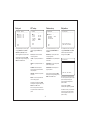
DIGITAL ZOOM (ON / OFF) - disables or
enables the 8x digital zoom. When disabled,
the maximum zoom level is 23x (optical).
IMAGE FLIP (ON / OFF)
<GROUP SETUP> - full management and
programming of group functions.
<WHITE BALANCE SETUP> - sub menu to
change the white balance settings
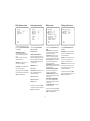
Move the joystick left and right to finely adjust
the width of the privacy zone and up and down
to finely adjust the height.
Highlight the setup menu required and key:
NEAR
<AUTO EXPOSURE SETUP> - sub menu to
change the auto exposure settings
To save the privacy zone, key: NEAR or key:
FAR to cancel.
Remember: A menu item surrounded by
brackets shows it has a sub menu.
8