1
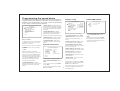
Edit label
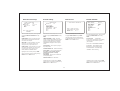
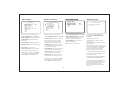
PRESET LABEL SETUP
----------------------------LAB FOR PRE
---------1234567890
ABCDEFGHIJ
KLMNOPQRST
UVWXYZ - .
SAVE
CANCEL
CLEAR
CANCEL
BACK
EXIT
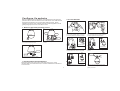
From the preset setup menu, use the joystick
to highlight EDIT LABEL and key: NEAR
The solid white square shows the current
cursor position.
The flashing white square shows the currently
selected character.
Move the joystick up / down / left / right to
choose the required character and key: NEAR
to insert it in the preset label. The solid white
square moves to the next cursor position.
Repeat until the preset label is complete.
If a mistake is made, use the joystick to select
the backspace ( ) and key: NEAR. The cursor
moves back one square.
Select OK to save the preset label or
CANCEL to lose changes, and key: NEAR to
exit
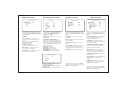
Auto Scan Setup
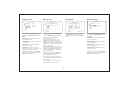
vSCAN SETUP
----------------------------SCAN NO.
1/8
1ST POS.
NONE
2ND POS.
NONE
SCAN SPEED
030
DIRECTION
NORMAL
CLEAR SCAN
CANCEL
RUN SCAN
BACK
EXIT
From the dome camera setup menu, use the
joystick to highlight SCAN SETUP and key:
NEAR
SCAN NO. (1-8) - shows the SCAN number
currently being modified.
1ST POS. - any defined preset between 1 &
127.
2ND POS. - any defined preset between 1
&127.
SCAN SPEED - determines the speed of
movement in degrees per second between
each preset position.
CLEAR SCAN - deletes the currently selected
VST function.
RUN SCAN - runs the currently selected
SCAN function for testing purposes
Highlight the item to modify and key: NEAR
Use the joystick to change the setting and key:
NEAR to save or: FAR to cancel.
Note:AV Vscan always moves anti-clockwise to
the 1st position and then clockwise to the 2nd
position.
12