1
Programming the speed dome
Display setup
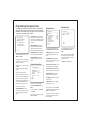
The speed dome setup menu allows the operator to customise and
program all aspects of speed dome operation. All menu settings are
retained in non-volatile memory so if power is lost to the speed dome
for any reason, all settings will be retained.
High SPEED DOME
----------------------------<SYSTEM INFORMATION>
<DISPLAY SETUP>
<DOME CAMERA SETUP>
<PASSWORD SETUP>
<SYSTEM INITIALISE>
EXIT
To access the speed dome setup menu, key:
PRESET - 95 - ENTER
To navigate the main menu, move the joystick
up / down to choose a menu item or change
settings within a menu item.
To enter a menu item or confirm a new setting,
key: NEAR
To exit a menu item or cancel a new setting,
key: FAR
Where a menu item is surrounded by
brackets, it indicates that there is a sub menu.
Where a menu screen shows EXIT, selecting
this option will exit the menu and the speed
dome will return to normal operation. Where a
menu screen shows BACK, selecting this
option will return to the higher menu level.
The main menu has five options:
<SYSTEM INFORMATION> - Provides
information such as firmware version, protocol
and ID values as defined by the dip switch
settings.
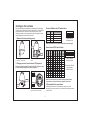
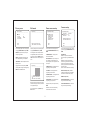
DISPLAY SETUP
----------------------------CAMERA ID
ON
PTZ INFORMATION
AUTO
ACTION TITLE
AUTO
PRESET LABEL
AUTO
ALARM I/O
AUTO
DATE/CLOCK
ON
<SET DATE/CLOCK>
<PRIVACY ZONE>
BACK
EXIT
<DISPLAY SETUP> - Allows the operator to
specify which On Screen Display information
is shown during normal operation. Also allows
privacy zones to be defined and time/date to
be changed
<DOME CAMERA SETUP> - Allows all
operating features of the speed dome to be
programmed and managed. Also allows
settings for the camera module to be changed
From the main menu, use the joystick to
highlight DISPLAY SETUP and key: NEAR
CAMERA ID (ON / OFF) - shows camera ID
according to the DIP switch settings, eg
CAM 1.
<PASSWORD SETUP> - Allows a password
to be set to protect the speed dome setup
<SYSTEM INITIALISE> - Allows various
speed dome settings to be reset to factory
defaults
PTZ INFORMATION (ON / OFF / AUTO) shows the current pan / tilt position in degrees
and the current zoom level.
System information
ACTION TITLE (ON / OFF / AUTO) - shows
current speed dome action, eg PRESET3.
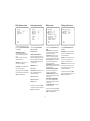
SYSTEM INFORMATION
----------------------------FIRMWARE VER
COLOUR SYSTEM
PROTOCOL
ADDRESS
BAUD RATE
:
:
:
:
:
PRESET LABEL (ON / OFF / AUTO) - shows
preset title (if defined) when a preset is called.
1.7T23
PAL
PELCO-D
1
2400
ALARM I/O (ON/OFF) - shows real time
status of the alarm inputs and outputs.
<SET DATE/CLOCK) - sub menu to change
the date and time
BACK
EXIT
<PRIVACY ZONE> - sub menu to setup the
speed dome privacy zones
From the main menu, use the joystick to
highlight SYSTEM INFORMATION and key:
NEAR
Highlight the item to modify and key: NEAR
Use the joystick to change the setting and key:
NEAR to save or: FAR to cancel.
To return to the main menu, highlight BACK
and key: NEAR
To exit the setup menu completely, highlight
EXIT and key: NEAR
7
Note: If the auto option is chosen, the relevant
information is displayed for a few seconds
before disappearing.
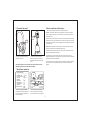
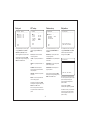
Set date/clock
SET DATE/CLOCK
----------------------------DATE
07/JAN/2007
CLOCK
14:37:15
BACK
EXIT
From the display setup menu, use the joystick
to highlight SET DATE/CLOCK and key:
NEAR
Highlight the item to modify and key: NEAR
Move the joystick up and down to change an
individual value and left and right to move to
the previous / next value
Key: NEAR to save or: FAR to cancel.