1
Quick Start Tutorial
d) Start the software.
Press ‘g’ on the keyboard or click on the Go or the Ready button to start taking data. The
motor will ramp up to the assigned motor speed. The software incorporates an auto-start
routine based upon the assign motor speed. If the motor does not attain this speed within a
defined few seconds, the software will continuously attempt to restart the motor and a Motor
stalled message will appear until the software detects rotation at
the set speed. If the head is cold this may take up to a few minutes.
(E.g. you just received the unit from the courier’s truck and the package and head is cool or
cold, or your lab is not temperature stabilized at a temperature above 20o C.) In order to
ensure that the head temperature stays fairly constant, the motor runs when the PC is powered
up, whether or not the software itself is on.
If the head stays stalled and becomes significantly warm, close the software, allow the head to
cool back to ambient, reconnect the head and restart the software. If the problem persists, call.
e)
As with any experiment with sub-micron resolution, it is recommended that for the most
accurate results the equipment is left permanently on. If this is not possible, always allow a
suitable period of warm-up before attempting to take the most accurate results.
IMPORTANT: Due to motor damping, the x absolute position is temperature dependent
to a small extent.
For this reason, never compare x position results taken in a situation where the head
temperature is varying by more than ± 5o C.
f)
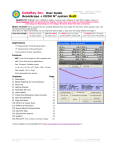
If you are reasonably well aligned, the beam centroid will be indicated within the centroid
target. If not you will need to adjust the beam in x and y by reading the Xc and Yc positions,
viewing the centroid screen, and adjusting the head or the assembly.
IMPORTANT: For accurate results, center the beam to within +250 µm or better. If you are
not well centered, then in extreme cases, not all the energy going through the slits will fall on
the detector and this shading will result in error.
Xc, Yc Position Running Average. The displayed centroid position is the running average of
four readings, except that any rotation-to-rotation centroid change of >2.0 µm is instantly
displayed and the running average is restarted. This ensures that the displayed centroid
position is both low-noise and lag-free.
Once within the target area, the readings will be accurate and the profiles may be analyzed as
discussed earlier in the chapter.
g) For BeamMap only, click the Setup menu and select Set Wavelength in order to ensure a
correct M2 reading.
3-32
BeamMap, Beam’R, ColliMate, BeamScope-P7