1
User Manual
CreaseStream Junior
9 Operating the CreaseStream Junior
9.1 Switching the machine on and off
9.1.1 To switch on
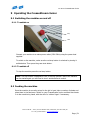
Stop
Start
Connect your machine to a mains power outlet (230V 50Hz) using the power lead
supplied.
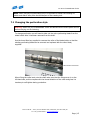
To switch on the machine, make sure the red stop button is unlocked by turning it
anticlockwise. Then press the green start button.
9.1.2 To switch off
To stop the machine press the red stop button.
Note: The stop button is designed to lock in the stop position. Before the machine
can be started again you will need to turn it anticlockwise to unlock.
9.2 Feeding the machine
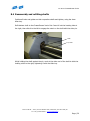
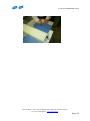
Once the machine is correctly set up for the job in hand, take a number of sheets and
place them in the feed area. Switch on your CreaseStream Junior and feed the sheets
in to the machine by hand, with the aid of a ‘rubber finger’ if necessary.
Tech-ni-Fold Ltd — Unit 2, St John’s Business Park, Lutterworth, Leics LE17 4HB, UK
Tel: +44 (0) 1455 554491 — www.technifold.com
Page | 21