1
DO172 (3)
The Go Software User Guide
Contents
Overview ....................................................................................................................................... 4
The ACEs supplied.................................................................................................................... 4
ACE Town scenario ............................................................................................................... 4
ACE Model Pack 1 and 2....................................................................................................... 5
ACE Interfaces ....................................................................................................................... 5
Example control programs ..................................................................................................... 5
Go operating modes .................................................................................................................. 5
System Requirements ................................................................................................................... 6
Installing the Go software.............................................................................................................. 6
Connecting an Interface ................................................................................................................ 6
Starting Go for the first time .......................................................................................................... 7
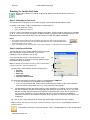
Step 1: Selecting a User level ................................................................................................... 7
Step 2: Interface selection ......................................................................................................... 7
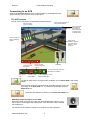
Connecting to an ACE................................................................................................................... 8
The ACE window ....................................................................................................................... 8
Sync and Simulation modes ...................................................................................................... 9
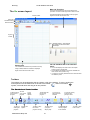
The Go screen layout .................................................................................................................. 10
Toolbars................................................................................................................................... 10
The Standard and Control toolbar........................................................................................ 10
The flowchart or procedure selector toolbar ........................................................................ 11
The Symbol toolbar.............................................................................................................. 11
The Map and Text View ....................................................................................................... 11
I/O and Variable panels ....................................................................................................... 12
Program terminology ................................................................................................................... 12
Placing symbols and entering commands .................................................................................. 13
Connecting the symbols.............................................................................................................. 13
Deleting flow lines.................................................................................................................... 14
Running a control program.......................................................................................................... 14
The Symbols ............................................................................................................................... 14
Selection .................................................................................................................................. 14
The Start symbol...................................................................................................................... 15
Start (Flowchart)................................................................................................................... 15
Procedure............................................................................................................................. 15
The Output symbol .................................................................................................................. 16
Switch Output....................................................................................................................... 16
Switch Motor ........................................................................................................................ 16
Sound................................................................................................................................... 16
Binary Output ....................................................................................................................... 17
The Process symbol ................................................................................................................ 18
Wait ...................................................................................................................................... 18
Procedure............................................................................................................................. 18
Make .................................................................................................................................... 19
The Decision symbol ............................................................................................................... 21
Is Input ................................................................................................................................. 21
Is Sensor .............................................................................................................................. 21
Is Variable ............................................................................................................................ 22
Is Binary Input ...................................................................................................................... 22
The Stop symbol...................................................................................................................... 23
Stop...................................................................................................................................... 23
Stop All................................................................................................................................. 23
Flow Line ................................................................................................................................. 23
Text Tool.................................................................................................................................. 24
© Data Harvest Group Ltd.
2