1
their ePortfolio. If you think you will need more, please contact Stylianos Hatzipanagos
at s.hatzipanagos@kcl.ac.uk.
2. Creating assets
In order to create an ePortfolio you will need to use the WebFolio tool located in the
‘create new’ menu. Any items you create or upload are known as assets and are saved
within your ePortfolio. They are called assets because they have value or are worth
something to you. All assets are private and secure unless you choose to share them
with others or publish them to a Gateway.
Types of assets include records (which are created and saved in PebblePad using the
record pads), WebFolios, WebLogs, and any files which you upload. All of your assets
are saved in a Personal Assets Store which is part of your ePortfolio system. Assets in
the store can be copied, shared, reviewed, edited or deleted.
Where an asset, including WebFolios and WebLogs, is shared the share permissions
extend to all of the items linked to the asset being shared.
Webfolio
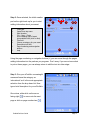
Step 1. To create a Webfolio, go to ‘create new’ menu then
select Webfolio from the pop-up selection.
PebblePad User Guide
Page 3