1
1. Logging in
Pebblepad is an online application which can be accessed from any PC with internet
access and Flash player installed. To log in to the PebblePad environment, type the
following information in your internet browser:
URL: http://www.pebblepad.com/kcl
Username: [your kings email username]
Password: [your kings email password]
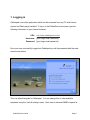
Once you have successfully logged into Pebblepad you will be presented with the main
menu screen below:
This is a default template for Pebblepad. You can change this to other available
templates using the ‘tools & settings’ menu. Each user is allocated 20MB of space for
PebblePad User Guide
Page 2