1
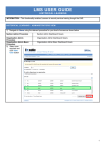
The options you then see will depend upon the type of request you have chosen
COURSE REQUEST
3) Highlight the course
Once you have highlighted your
chosen course, select Request
Course
NEW LEARNING
ACTIVITY
REQUEST
RECORD
HISTORICAL
LEARNING
PLEASE GO
DIRECTLY TO STEP 7
PLEASE GO
DIRECTLY TO STEP 7
Steps 3, 4 , 5 and 6 do
not apply
Steps 3, 4 , 5 and 6 do
not apply
4) Select Request Course
You will then see information about the course that you have selected
5) Check the course details
Check the course details to
ensure that this suitable for
you, then Select Request
Course to proceed with the
request
6) Select Request Course
3