1
5.2
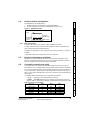
Quick start flowchart
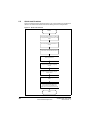
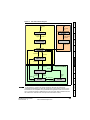
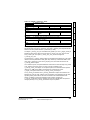
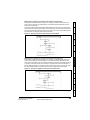
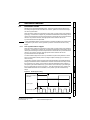
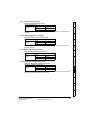
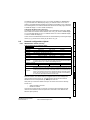
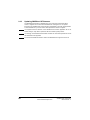
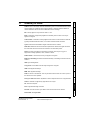
Figure 5-3 details the steps required to achieve cyclic communications on the EtherCAT
network. This flowchart should be used as the starting point for all configurations.
Figure 5-3 Quick start flowchart
START
Ensure the Control Techniques .xml file is in
the appropriate folder on the hard drive of the
master
Check the LED status of the SM-EtherCAT
module
In the master, scan the EtherCAT network
Select required PDOs
Configure the PDOs with the mappings
required
Configure the Sync managers using the
required PDOs
Download or activate the configuration to the
master
Check the front of the SM-EtherCAT module
to ensure that the LED relating to the
connection being used is flashing, this
confirms that communications are functioning
END
18
www.controltechniques.com
SM-EtherCAT User Guide
Issue Number: 5