1
•
•
•
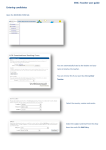
You can choose to Exclude Missing Values by inserting a tick next to the relevant data-field(s). This
will exclude participants where UK Biobank does not have a value recorded (see User guidance
notes).
Data-fields can be removed by clicking the Remove hyperlink.
Data-fields can be customised by clicking the Customise hyperlink next to the relevant data-field:-
A pop-up box (like the one to the left) will appear over the list of
selected materials. Please click the customisation that you wish to
apply to that field e.g. in the box to the left data-field 31 Sex has been
customised to select male participants only.
Click OK to confirm the customisation or Cancel to cancel your actions.
Please note that customising a data-field will restrict your data set to
only those participants who meet the customised criteria. Too much
customisation may result in a blank output file.
‘Final Confirmation’ (Part 4 of 4)
The page below is the final stage of the Main Application Form. You will only be able to submit the
application after confirming that all the information provided in the application is full and correct. If you try
to submit the application without checking ‘yes’ a pop-up warning box will appear on screen.
It is recommended that researchers read the Terms and Conditions of the UK Biobank Material Transfer
Agreement (MTA) which can be found within Annex II of our Access Procedures. The Access Procedures
can be located via the hyperlink on this page or in the ‘Resources’ tab on the UK Biobank website
(www.ukbiobank.ac.uk).
Click Previous to return to Part 3 of the Main Application, Save as Draft to save and return to the AMS
‘Home Page’ or Submit to submit your Main Application.
• Data Release
The Access Team will notify you by email when the dataset has been scheduled for extraction and release.
Prior to data release the Applicant PI will be able to log in to the AMS, selecting the Data Collection
hyperlink which will re-direct you in to the Data Showcase where the Downloads hyperlink can be selected.
UK Biobank
Resource Access Management System (AMS) User Guide v1
June 2014