1
Chapter 4 — Configuration Command Reference
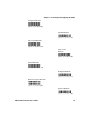
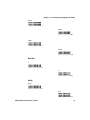
Trigger Mode
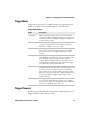
Trigger mode allows you to set different types of triggering options
for the scan engine. For more information, see the next table.
Trigger Mode Options
Mode
Description
Continuous
When you pull the trigger, the red scanner beam turns
and stays on. When you pull the trigger a second time, the
scanner beam turns off. Simply releasing the trigger does
not turn off the scanner.
Level
When you pull the trigger, the red scanner beam turns on
and stays on until you release the trigger or until the
SR61T successfully decodes a bar code.
Pulse
When you pull the trigger, the red scanner beam turns on.
The scanner remains on until the scanner successfully
decodes a bar code or the Trigger Timeout period is
reached.
Flashing
When you pull the trigger, the red scanner beam turns on
and the SR61T checks for a bar code to read. The scanner
starts flashing when the Trigger Timeout period is
reached. When the SR61T finds and reads a bar code, it
resets the Trigger Timeout period. If you pull the trigger a
second time, the scanner beam turns off.
Autostand
Autostand mode allows you to switch between level mode
and flashing mode. The first time you pull the trigger, the
scanner beam turns on and the scanner is in flashing
mode. Switch to level mode by pulling the trigger again.
When you release the trigger, the scanning beam goes off
and stays off until the trigger timeout expires and it
resumes flashing.
Aim
Aim triggering allows you to turn on the scanner and aim
the red scanner beam without causing a decode. When
you release the trigger, the aiming beam stays on until the
scanner successfully decodes a bar code.
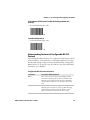
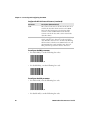
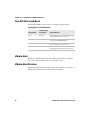
Trigger Timeout
Sets the trigger timeout for the Trigger Mode command. You can set
trigger timeout from 1 to 4095 seconds.
SR61T Tethered Scanner User’s Guide
57