1
Table of Contents
Preliminary..............................................................................................................................................2
Anti-static handling precautions...............................................................................................................2
Power supply voltage range......................................................................................................................2
Legal disclaimer.......................................................................................................................................2
Overview of the H0420............................................................................................................................3
Connecting the H0420.............................................................................................................................3
CompactFlash card...................................................................................................................................3
Power connector.......................................................................................................................................4
Audio outputs...........................................................................................................................................4
Button inputs............................................................................................................................................4
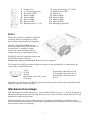
General purpose input/output pins............................................................................................................5
LCD connection.......................................................................................................................................6
RS232.......................................................................................................................................................7
Mechanical montage................................................................................................................................7
Contents of the CD-ROM........................................................................................................................9
Installing the development tools..............................................................................................................9
Using the ready-made scripts...................................................................................................................9
Writing scripts.........................................................................................................................................9
Further reading.......................................................................................................................................12
Transferring files...................................................................................................................................12
MP3 file requirements............................................................................................................................13
Track duration & seeking to a position...................................................................................................13
ID3 Tags and synchronized events.........................................................................................................13
Adding “synchronized lyrics” to an MP3 file.........................................................................................14
Trouble shooting....................................................................................................................................15
Specifications.........................................................................................................................................16
General...................................................................................................................................................16
Audio......................................................................................................................................................16
Control...................................................................................................................................................16
Mechanical.............................................................................................................................................16
Operating conditions..............................................................................................................................16
Firmware................................................................................................................................................16
Preliminary
Anti-static handling precautions
Please observe anti-static handling precautions when handling the device, as it contains components that are
sensitive to static discharges.
Power supply voltage range
Please verify the power supply voltage to be within the range that the device supports, and that the polarity is
correct. See page 15 for the specifications and page 4 for the power connector. Voltages outside the
appropriate range may cause malfunction. Voltages above the high limit or with inverted polarity may
damage the device.
Legal disclaimer
ITB CompuPhase shall not be liable for the incidental or consequential losses or damage to tangible property,
injury or death of a person in connection with the use of this device. Although the examples in this guide
have been tested with care, they may contain errors and they are not guaranteed for any particular purpose.
2