1
USER GUIDE
23.6.1 Refresh............................................................................................................................. 26
23.6.2 Video Adjust ..................................................................................................................... 26
23.6.3 Advanced ......................................................................................................................... 26
23.7 Power cycle.............................................................................................................................. 27
23.8 Keyboard key sequences ......................................................................................................... 27
23.9 Synchronizing mouse pointers.................................................................................................. 29
23.9.1 Aligning the mice pointers................................................................................................. 29
23.9.2 Calibrating mice pointers .................................................................................................. 29
23.9.3 Manual mouse synchronization......................................................................................... 30
23.10 Switching to a different server/device ..................................................................................... 31
23.11 Disconnecting the remote session .......................................................................................... 32
24. Troubleshooting - Safe mode ......................................................................................32
24.1 Entering Safe mode.................................................................................................................. 32
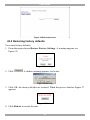
24.2 Restoring factory defaults ......................................................................................................... 34
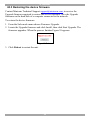
24.3 Restoring the device firmware .................................................................................................. 35
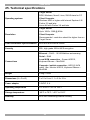
25. Technical specifications ..............................................................................................36
26. Video resolution and refresh rates .............................................................................37
27. Safety.............................................................................................................................37
28. User guide feedback ....................................................................................................37
29. WEEE compliance ........................................................................................................37
© 2009 Copyright Minicom Advanced Systems. All rights reserved.
2