1
Introduction
This extension adds printing capabilities to OpenJUMP. It is targeted at users who
would like to print a copy of their map displays directly from the OpenJUMP
Workbench.
The capabilities include:
•
To print a map at a nominated scale on one or more sheets of paper.
•
To save the printer image as an image file in JPG, PNG, SVG or PDF formats.
•
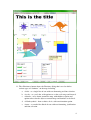
A preview window that shows the current map display with superimposed
printer page boundaries.
•
A printer setup option to set printed page properties.
•
A full page option to scale the map to be printed in a single page.
•
Options to add furniture items to the printed map, including a title, scale, north
symbol, map legend, layer legend, border, images and a multi-line text note.
•
The capability to re-position the map drawing on the printed page(s).
•
Zoom and pan facilities.
•
Internationalization capabilities.
•
From version 1.53:
o Most furniture items can be scaled. There is a size field in the
appropriate dialog which accepts a number between 0.1 and 10.0. This
scale factor is applied to the furniture item when displayed and printed.
o Each project can have multiple printer configuration files that can be
user created and selected.
•
From Version 1.67
o New image type furniture items
o Furniture items are specified on a layer to control the order in which
they are painted.
o Furniture size scaling has been replaced by more options to specify
font sizes. North and Scale items can still be scaled.
o More options to specify text fonts and colors.
o Multiple border items now allowed.
This plugin requires JRE 1.5 or later.
Installation
The java archive file JumpPrinter.jar should be copied into the lib\ext folder of the
OpenJUMP installation folder. The extension will then be loaded next time
OpenJUMP is started.
2