1
C.4.2 Description of command buttons:
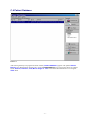
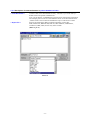
Picture 7
< New Patient >
Here you can create a new patient with all relevant data. The plan date is set
automatically by the software to the current date. (Refer to pic. 7)
LNote: You can use the < TAB > key to enter each field.
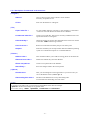
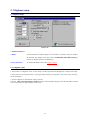
< Beam info >
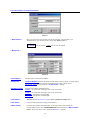
Picture 8
<Description>
The description of the field is editable.
<Distances>
< Source-Surface > means the distance of the beam source to patient (or film) surface.
< Source-Tray > distance of block tray holder bottom edge to beam source
The default values are taken from the < Preferences > settings.
<Radiation field>
Specifies the radiation field dimensions
< Left > = X-coordinate of the upper left corner of the field
< Top > = Y-coordinate of the upper left corner of the field
< Width > specification of field width
< Height > specification of field height
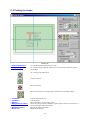
| Edit blocks |
Skips to the Edit the shadow window (closer specified in chapter C.2.)
| New beam |
Creates a new field in the existing patient dataset.
| Mirror beam |
Creates a mirrored block automatically. To arrange a mirror block mark the
corresponding block in the <Loaded data set> field and click the <Mirror beam>
button. Then a new block with a prefixed „Mirror of ...“ appears.
- 12 -