1
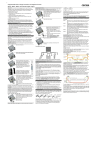
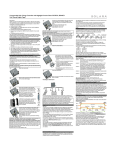
Programmable Solar Charge Controller with Nightlight Function CXN10-1.1, CXN20-1.1, CXN40-1.1 User Manual English, Page 2 Optional Functions Interface and Datalogger (CXI and CXCOM) The controller comes with a serial interface, which can be connected to a PC with an optional interface adapter (CX-I) (see interface adapter manual for details). In Programming Menu 8 (Serial interface BIDIRECTIONAL, NO EXCESS ENERGY , is also default setting) the behaviour of the serial interface can be modified. WARNING: The combination of different errors may cause damage to the controller. Always remove errors before continue connecting the controller! Error condition External Temperature Sensor (CXNT) (1) Display Reason Battery is low Overcurrent / Short circuit of loads Loads are not supplied Flashes With the optional temperature sensor (CXNT), CXN can measure the battery temperature and adjust the charging voltage accordingly to extend the battery life span. See CXNT manual for details. You enter the programming mode with a long push (2s-8s) on the button. The programming menu structure is described as below. Menu 1: Battery type In this menu, you can select the proper battery type - liquid electrolyte or GEL (VRLA) according to your PV system to get better charge of your battery. The default battery type is liquid electrolyte. In this menu, you can set 5 different LVD modes to protect the battery from being deep discharged. Please see section DESCRIPTION OF FUNCTIONS for details. The default low voltage disconnect (LVD) setting is Mode 1 - Disconnect at 11.4 V (at nominal load current) up to 11.9 V (at no load current). Menu 3: Nightlight function (type) In this menu, you can set the type of nightlight function or switch off the nightlight function of your CXN controller. The default setting of nightlight function type is OFF. Menu 4: Nightlight function (evening settings) When the nightlight function type is set to EVENING/MORNING mode, you can set the load ON hours after sunset in this menu. The default load ON hours after sunset is 0 hr. Menu 5: Nightlight function (morning settings) When the nightlight function type is set to EVENING/MORNING mode, you can set the load ON hours before sunrise in this menu. The default load ON hours before sunrise is 0 hr. Menu 6: Day/Night threshold In this menu, you can set the open circuit voltage of PV panel that the CXN controller should know it’s day or night. The default day/night threshold is 4.9V for 12V PV system (9.8V for 24V PV system). Menu 7: Buzzer on/off You can turn ON/turn OFF the buzzer in this menu. Menu 8: Settings of Excess Energy Management and datalogger To use CXI or CXM, the functions of CXN interface should be properly set in this menu. Menu 9: Individual / factory settings You can save your current menu setting or reset to default factory setting in this menu. Programming logout When you exit programming menu, the controller displays the state of charge (available energy) of the battery and the status of the load. Mind that once you have entered the programming menu you can exit it at the last item only. We therefore recommend that you first note down your required settings in the check boxes beside the menu structure and then do the programming in one go. This makes programming easier and avoids errors. All programming settings are stored in a non-volatile memory and remain stored even if the controller was disconnected from the battery. Safety Features The controller is protected against wrong installation or use: At the solar At the battery At the load terminal terminal terminal Battery connected with correct Unrestricted Normal operation Unrestricted polarity Battery connected Unrestricted. Acoustic with wrong Unrestricted Unrestricted Warning polarity Load output is Yes, if only the Yes, not at 24V protected, but battery is connected. Reverse polarity loads might be system voltage. Acoustic Warning damaged. Unrestricted. CAUTION: Battery Short circuit Unrestricted Unrestricted must be protected by fuse. Controller limits Controller switches Overcurrent -------------------current. off load terminal. Controller is Controller switches Thermal overload electronically -------------------off load terminal. protected. No connection Unrestricted Unrestricted Unrestricted Reverse current Unrestricted --------------------------------------Varistor 56 V, Controller switches Overvoltage Max. 40 V 2.3 J off load terminal. Normal Controller switches Controller switches Undervoltage operation off load terminal. off load terminal. Controller is thermally overloaded and has disconnected the loads. Battery voltage too high (>15.5 / 31.0 V) Programming your CXN Menu 2: Low voltage disconnect Main Menu Battery is flat after short time Battery is not being charged during daytime No upmoving bars Battery wrong polarity Permanent sound Controller limits solar current Flashes Remedy Load will reconnect as soon as battery is recharged. Switch off all loads. Remove short circuit. Controller will switch on load automatically after max 1 minute. Check proper ventilation of controller. After cooling down the loads are reconnected automatically. Check if other sources overcharge the battery. If not, controller is damaged. Battery wires or battery fuse damaged, battery has high resistance Check battery wires, fuses and battery. Battery has low capacity Change battery Solar array faulty or wrong polarity Check Solar array and wiring Battery is connected with reverse polarity Controller is thermally overloaded Solar array exceeds nominal current of controller. (2) Setting Facto r y Yo ur B atter y type G EL (VRLA ) Lo w vo ltage dis co nnect cur r ent co mpens ated 11.4 - 11.9 V Lo w vo ltage dis co nnect cur r ent co mpens ated 11.0 - 11.75 V Sho r t pus h < 1 Seco nd Lo ng pus h > 1 Seco nd LVD cur r ent co mpens ated / adaptive 11.0 - 12.2 V Lo w vo ltage dis co nnect 11.5 V Lo w vo ltage dis co nnect 11.0 V (3) Nightlight functio n O FF Nightlight functio n DU SK TO DAW N Nightlight functio n EVENING/MO RNING (4) Nightlight functio n EVENING O FF Nightlight functio n EVENING 1 H R Nightlight functio n EVENING 2 H RS Nightlight functio n EVENING 3 H RS Nightlight functio n EVENING 4 H RS Nightlight functio n EVENING 5 H RS Nightlight functio n EVENING TO 4 H RS befo r e mid o f night Nightlight functio n EVENING TO 3 H RS befo r e mid o f night Remove reverse polarity Nightlight functio n EVENING TO 2 H RS befo r e mid o f night Mount controller at a location with better ventilation Check solar array current. Nightlight functio n EVENING TO 1 H R befo r e mid o f night Nightlight functio n EVENING TO mid o f night (5) Nightlight functio n MO RNING O FF Nightlight functio n MO RNING 1 HR Intended Use The charge regulator is intended for use in photovoltaic systems with 12 V or 24 V nominal voltage. It shall be used with vented or sealed (VRLA) lead acid batteries only. Safety Recommendations Batteries store a large amount of energy. Never short circuit a battery under all circumstances. We recommend connecting a fuse (slow acting type, according to the nominal regulator current) directly to the battery terminal. Batteries can produce flammable gases. Avoid making sparks, using fire or any naked flame. Make sure that the battery room is ventilated. Avoid touching or short circuiting wires or terminals. Be aware that the voltages on specific terminals or wires can be up to double the battery voltage. Use isolated tools, stand on dry ground and keep your hands dry. Keep children away from batteries and the charge regulator. Please observe the safety recommendations of the battery manufacturer. If in doubt, consult your dealer or installer. Nightlight functio n MO RNING 2 HRS Nightlight functio n MO RNING 3 HRS Nightlight functio n MO RNING 4 HRS Nightlight functio n MO RNING 5 HRS Nightlight functio n MO RNING FRO M 2 HRS after mid o f night Nightlight functio n MO RNING FRO M 3 HRS after mid o f night Nightlight functio n MO RNING FRO M 4 HRS after mid o f night Nightlight functio n MO RNING FRO M 5 HRS after mid o f night Liability Exclusion Nightlight functio n MO RNING FRO M 6 HRS after mid o f night The manufacturer shall not be liable for damages, especially on the battery, caused by use other than as intended or as mentioned in this manual or if the recommendations of the battery manufacturer are neglected. The manufacturer shall not be liable if there has been service or repair carried out by any unauthorised person, unusual use, wrong installation, or bad system design. Opening case voids warranty. (6) Day/Night thr es ho ld 1.0 / 2.0 V So lar vo ltage Day/Night thr es ho ld 1.6 / 3.1 V So lar vo ltage Day/Night thr es ho ld 2.1 / 4.2 V So lar vo ltage Technical Data Max. load current Pr o gr amming Menu (flas hing) Lo ad o n/o ff General Safety and Usage Recommendations Nominal voltage Absorption voltage Equalization voltage Float voltage Load disconnect voltage Load reconnect voltage Temperature compensation Max. solar panel current Dis play Menu B atter y type liquid electr o lyte Error Description Remote Display (CXM) The CXM remote display is designed to display panel current, load current and battery voltage of your PV system and status values like charging, overload, low voltage disconnect as symbols. Additional it can display several values of CXN’s datalogger of the past 7 days such as Ah, SOC, Battery voltage (morning, evening). This provides you more detailed information of your PV system. See CXM manual for details. In Programming Menu 8 (Serial interface BIDIRECTIONAL, NO EXCESS ENERGY , is also default setting) the behaviour could modified. State o f C har ge 12 / 24 V, automatic recognition 14.4 / 28.8 V (25°C), 0.5-2h 14.8 / 29.6 V (25°C), 2 h 13.7 / 27.4 V (25°C) 11.0-12.2 / 22.0 -24.4 V depending on setting 12.8 / 25.6 V -4 mV/cell*K Day/Night thr es ho ld 2.7 / 5.4 V So lar vo ltage 10 / 20 / 40 A according to model number @ 25°C (without load current at 50°C) 10 / 20 / 40 A according to model number @ 25°C (without solar current at 50°C) 89 x 90 x 38 mm (w x h x d) CXN10, CXN20: 175 gr, CXN40: 186gr 16 mm² (AWG #6) 6 mA -25 to + 50 °C Day/Night thr es ho ld 4.9 / 9.8 V So lar s pannung Dimensions Weight Max. wire size Self consumption Ambient temperature range Case protection IP 22 Subject to change without notice. Version: CXN070606 Made in one of the following countries: China – Germany Phocos AG – Germany www.phocos.com Day/Night thr es ho ld 3.2 / 6.5 V So lar vo ltage Day/Night thr es ho ld 3.8 / 7.6 V So lar vo ltage Day/Night thr es ho ld 4.4 / 8.8 V So lar vo ltage Day/Night thr es ho ld 5.5 / 11.0 V So lar vo ltage Day/Night thr es ho ld 6.0 / 12.1 V So lar vo ltage Day/Night thr es ho ld 6.6 / 13.2 V So lar vo ltage Day/Night thr es ho ld 7.2 / 14.3 V So lar vo ltage Day/Night thr es ho ld 7.7 / 15.4 V So lar vo ltage (7) B uzzer O N B uzzer O FF (8) Ser ial inter face EX C ESS ENERGY & C U RRENT DATA Ser ial inter face EX C ESS ENERGY & DATA LO GG ER Ser ial inter face B IDIREC TIO NAL, NO EX C ESS ENERGY (9) Keep individual s ettings Res et to facto r y pr es et Date o f yo ur o w n s ettings :