1
Amate Electroacústica,s.l.
4.THE SOFTWARE
In order to get the maximum performance out of the loudspeaker systems with the
DSPController, it is recommended to manage them from a PC with the DSPController
software. This software is supplied with each system and also available for
downloading from the website www.master-audio.com.
With the software it is possible to remotely control the response of all the systems by
modifying the parameters of each DSP.
Please read carefully this chapter to learn all the possibilities offered by the remote
control software.
4.1.Communication
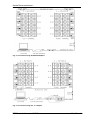
To link the PC with the speaker systems it is necessary to follow the process
described in Chapter 2 of this manual.
The communication is based on a multi-drop bus, where the PC acts as master and
the loudspeaker systems as slaves. To allow the PC identifying each of the systems
attached to the bus, it is necessary that each element has a unique ID (see Chapter 2
to learn more about ID assignation).
The data transmission standard used is the well-known RS-485 of the EIA. It is
specially indicated for industrial applications with multiple elements distributed along
a big distance.
The PC establishes a data interchange with the microcontroller of each loudspeaker
system, and each microcontroller feeds the parameters to the DSP depending on the
instructions received from the PC. Should the computer hang or the communication
be lost, the loudspeakers will still reproduce the sound because the communication
system is completely independent of the signal processing subsystem.
4.2.Software layout
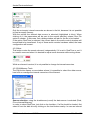
After executing the program “DSPController.exe”, a presentation screen is shown.
After that, the main window is presented.
DSPController.Version 1.2 ENG
Feb 09
21