1
Amate Electroacústica,s.l.
1.INTRODUCTION
This manual is aimed to describe all the installation and operation instructions related
to the DSPController module. This module is a built-in feature in all the speaker
systems of the MA series version “D” by Master-Audio. If specific information about a
certain model is required, please refer to the User’s Guide of the model itself.
In order to proceed with a quick start-up of the system, consider also reading the
“DSPController Quick Installation Guide”.
This manual describes the features of the following product versions:
Software DSPController: v2.4
Firmware DSPController: v1.1.x.x
Should you own different product versions, there may be differences between the
actual product and the description written here.
1.1.Components of the system
1.1.1.The DSPController module
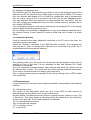
The DSPController module is built in every MA series version D cabinet, and has
three main functions:
1) Carry out the digital audio signal processing (by means of the DSP) before routing
the signal to the amplifiers: filtering, equalization, limiting, etc.
2) Allow the user to modify the basic parameters of the DSP, thanks to the control
module on the back panel of the acoustic enclosure (LCD and keypad).
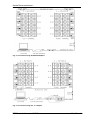
3) Provide with a connection interface which allows the remote control of the DSP
parameters of each system from a PC, using the supplied software.
Fig. 1: Built-in DSPController control panel
1.1.2.The DSPController Software
This software is a PC application, which provides the user with a Graphic User
Interface (GUI). With this interface, the user is able to manage the DSP parameters of
each speaker system remotely from the PC, thus modifying its frequency response. It
allows the connection of up to 64 systems simultaneously.
It is designed for PC with Windows operating systems (Win2000 and above).
1.1.3.The USB-485 converter
The systems with the DSPController module use the EIA communication standard
RS-485. A converter is needed in order to enable a regular PC to communicate using
this standard. The converter is connected to one of the computer’s USB port and,
after installing the adequate drivers, the computer will be able to connect to the RS485 bus.
This converter and the cables needed are supplied together with the speaker
systems.
DSPController.Version 1.2 ENG
Feb 09
2