1
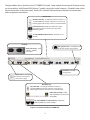
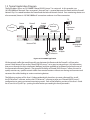
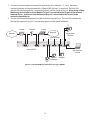
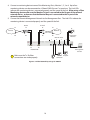
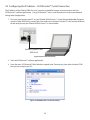
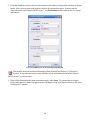
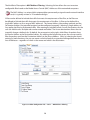
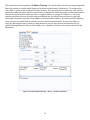
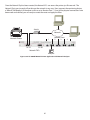
8. Connect a monitoring device to one of the Monitoring Ports, Monitor 1, 2, 3 or 4. Up to four
monitoring devices can be connected to a Filtered SINGLEstream™ at one time. The Link LEDs
indicate the monitoring device is connected properly and the speed of the link. When using a Fiber
Monitoring device make sure the Monitor Tx port is connected to the Rx port of the external
network device; and ensure that the Monitor Rx port is connected to the Tx port of the
external network device.
9. Connect the Remote Management Network to the Management Port. The Link LEDs indicate the
monitoring device is connected properly and the speed of the link.
Firewall
Tx
Router
Tx
Tx
Tx
Internet
Tx
Network
Rx
Rx
Rx
Rx
Application
Monitor
Rx
Monitor Ports
2
1
3
Tx Rx
Tx Rx
1A
1B
Network TAP
!
4
Tx Rx
Remote
Management
Console
Make sure the Tx / Rx fiber
connections are made properly.
IDS
Forensic
Collection
Figure 2.12 Fiber Network Tap using FSS-1000LX
16
Analyzer