1
1 INTRODUCING PEERWISE
PeerWise is a free web-based, multiple choice question repository, where students develop questions pertaining
to course content. Students create questions with up to 5 plausible answers and provide explanations for the
correct answer. The questions can include text, equations, graphs, chemical formulae and images. Students also
answer questions submitted by others. Once they have done so, they see which answer option is listed as
correct, the distribution of the responses contributed to date and an explanation of the answer. Additionally,
students can request help from the author of a question, rate the question for difficulty and quality, and
comment on the question. Only the instructor can see the name of the author of questions or comments to
allow the option of intervening if anything inappropriate is posted. The instructor does not edit, correct or
comment on the questions.
2 ACCESS TO PEERWISE
Instructors
PeerWise is free to both instructors and students. The first time you use PeerWise you must create an instructor
account: http://peerwise.cs.auckland.ac.nz/join/
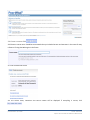
Enter your name and UNB email, and “University of New Brunswick” as the institution name. Press Request
Instructor Account. You will be emailed a verification code, which you can copy and paste onto the next screen.
Your account will be created and details will be emailed to you within 1-2 days.
3 STEP-BY-STEP EXAMPLE
1A. Login to the UNB PeerWise site at: http://peerwise.cs.auckland.ac.nz/at/?unb_ca. Use the username and
password provided in the email from PeerWise (after you register it takes about 1-2 days to receive the email).
PeerWise User Guide
printed 2013-Nov-13, 3:55 PM
page 1 of n
Created: 2013 Oct-01
Updated: 2013-Oct-82013 Oct-082013 Oct-082013 Oct-08