1
You may notice that we didn't create a filter for the
1:12 class. It might be more clear to do so, but this
illustrates the use of the default. Any packet not
classified by the two rules above (any packet not
from source address 1.2.3.4) will be put in class 1:12.
Now we can optionally attach queuing disciplines to
the leaf classes. If none is specified the default is
pfifo.
tc qdisc add dev eth0 parent 1:10 handle
20: pfifo limit 5
tc qdisc add dev eth0 parent 1:11 handle
30: pfifo limit 5
tc qdisc add dev eth0 parent 1:12 handle 40: sfq perturb 10
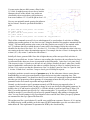
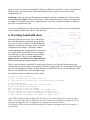
That's all the commands we need. Let's see what happens if we send packets of each class at 90kbps
and then stop sending packets of one class at a time. Along the bottom of the graph are annotations like
"0:90k". The horizontal position at the center of the label (in this case near the 9, also marked with a
red "1") indicates the time at which the rate of some traffic class changes. Before the colon is an
identifier for the class (0 for class 1:10, 1 for class 1:11, 2 for class 1:12) and after the colon is the new
rate starting at the time where the annotation appears. For example, the rate of class 0 is changed to 90k
at time 0, 0 (= 0k) at time 3, and back to 90k at time 6.
Initially all classes generate 90kb. Since this is higher than any of the rates specified, each class is
limited to its specified rate. At time 3 when we stop sending class 0 packets, the rate allocated to class 0
is reallocated to the other two classes in proportion to their allocations, 1 part class 1 to 6 parts class 2.
(The increase in class 1 is hard to see because it's only 4 kbps.) Similarly at time 9 when class 1 traffic
stops its bandwidth is reallocated to the other two (and the increase in class 0 is similarly hard to see.)
At time 15 it's easier to see that the allocation to class 2 is divided 3 parts for class 0 to 1 part for class
1. At time 18 both class 1 and class 2 stop so class 0 gets all 90 kbps it requests.
It might be good time to touch concept of quantums now. In fact when more classes want to borrow
bandwidth they are each given some number of bytes before serving other competing class. This
number is called quantum. You should see that if several classes are competing for parent's bandwidth
then they get it in proportion of their quantums. It is important to know that for precise operation
quantums need to be as small as possible and larger than MTU.
Normaly you don't need to specify quantums manualy as HTB chooses precomputed values. It
computes classe's quantum (when you add or change it) as its rate divided by r2q global parameter. Its
default value is 10 and because typical MTU is 1500 the default is good for rates from 15 kBps (120
kbit). For smaller minimal rates specify r2q 1 when creating qdisc - it is good from 12 kbit which
should be enough. If you will need you can specify quantum manualy when adding or changing the
class. You can avoid warnings in log if precomputed value would be bad. When you specify quantum
on command line the r2q is ignored for that class.
This might seem like a good solution if A and B were not different customers. However, if A is paying
for 40kbps then he would probably prefer his unused WWW bandwidth to go to his own other service
rather than to B. This requirement is represented in HTB by the class hierarchy.