1
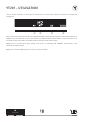
YT201 - USING YOUR TUNER
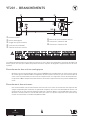
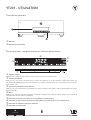
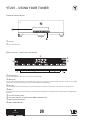
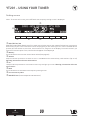
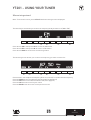
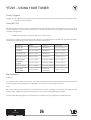
Frequency setting screen
Nota : To access this screen, press the MENU button while on the stations memories screen (see page
20)
s
r
j
k
l
m
n
o
p
q
j
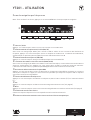
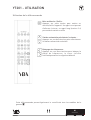
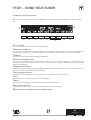
On / Stand by
Press this button to switch the tuner on and stand by
k Mono / stereo (MO / ST)
Your tuner is set by default to receive FM in stereo. In case of a weak signal, forcing the mono mode may
improve hearing quality. In mono mode a speaker symbol appears at the top right corner of the display s
l AM / FM
Press this button to switch between AM and FM bands.
m Manual mode (MAN / AUTO)
Your tuner is set by default to automatic search mode. It locks on as soon as it detects a radio signal. Press
this button to access the manual search mode. In manual mode, a symbol MAN appears at the top right
corner of the display s
n RDS decoding activation
Press this button to enable or disable the RDS decoding, and replace the station name with its frequency. This
function is available only for RDS emitting stations.
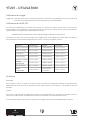
o Running frequency button
Use these buttons to adjust the current frequency : increase with F+, decrease with F-
p Set
Press this button to access the setup menu (see page 22)
q Back
Press this button to go back to the previous menu (stations memories)
rCurrent memory index
Displayed only if the current frequency is already within your stored stations
sState indicators for both Manual search and Mono modes
21